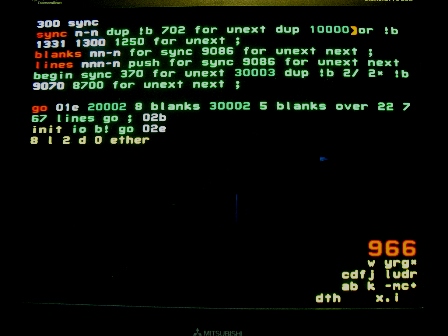
Although separate horizontal and vertical sync signals are available, monitors seem to accept composite sync with both combined on the horizontal input. This saves a pin.
Sync is on pin 14 (300.17) and Start on pin 15 (300.1). The number 20002 says that the sync pulse will go low (while Start remains low). The number 30002 inverts the sync pulse.
Go then generates 23 more normal blank lines at the top of the frame and 768 visible lines. Changing the balance of 23 top and 9 bottom lines, while retaining the total of 32, may adjust the vertical position of an image. This depends on the monitor and doesn't work well for me. I have to adjust the vertical position on the monitor.
Sync is called by both blank and visible lines, so needs to be compatible with both. And both leave a number on the stack, which may be good or bad, I haven't decided.
The difference between blank and visible lines is the Start pulse. It's generated after sync and an appropiate delay (which should be factored into sync?). It uses a notable trick, 2/ 2* to set bit 0 to 0.
The blank and visible line lengths should be identical. An oscilloscope is helpful in setting this. Or trial and error looking at a display. A very small difference (ns) can be visible as a shift in the position of the top line(s) of an image.
If this can't be calibrated out, you'll have to use a clocked sync, instead of relying on node delays.
You can see a horizontal shift between lines with lots of pixels and those with few. This could be due to a dip in I/O power (or perhaps temperature). If it's troublesome, use a clock.